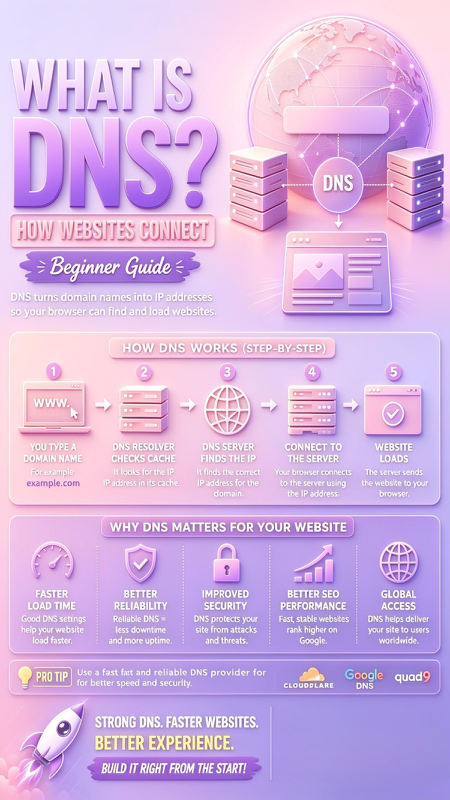
What is DNS? Beginner Guide
Understand exactly how websites connect, work, and load in your browser — explained simply

Have you ever wondered how typing a simple name like example.com instantly brings up the right website? Behind every click, there is a powerful system working silently — and it is called DNS. It is often called the “Phonebook of the Internet”, and without it, the web as we know it simply would not work. In this complete beginner-friendly guide, I will explain what DNS is, exactly how it works step-by-step, why it is critical for your website speed, security, and SEO, and which providers are best to use.
It translates names we understand → into numbers computers understand
Domain Name ➜ IP Address
What Exactly Is DNS?
DNS stands for Domain Name System. In simple words, it is a global system that converts human-readable website names (like google.com or yourblog.com) into machine-readable IP addresses (like 142.250.190.46).
Computers, servers, and devices communicate using numbers (IP addresses), but humans are bad at remembering long strings of numbers. DNS solves this problem: it acts like a translator or a contact list. You type the name, DNS finds the correct number, and connects you to the right server instantly. It is the foundation of how every website connects and loads.
How DNS Works: Step-by-Step Explanation
The whole process happens in milliseconds, but there are exactly 5 clear steps every time you visit a site. Here is the full journey:
You Type a Domain Name
You enter the website address in your browser bar, for example: example.com. Your computer knows it needs to find the IP address for this name, so it sends a request to a DNS Resolver (usually provided by your internet provider or custom setting).
DNS Resolver Checks Cache
The resolver first checks its own memory (cache). If someone visited this site recently, it already has the IP address saved — and sends it back immediately. This is why frequent sites load so fast! If not found, it continues the search.
DNS Server Finds the IP
The resolver asks authoritative DNS servers around the world. These are the official databases that hold the records. They look through the system until they find the exact match for example.com and return the correct IP address to your resolver.
Connect to the Server
Now your browser finally has the real IP address. It sends a request directly to that specific server: “Hello, I want to see the website at this address”. The connection is established.
Website Loads
The server receives your request, gathers all the files, images, and data, and sends it back to your browser. Your browser then builds the page on your screen — and you see the website fully loaded.
Why DNS Matters For Your Website: 5 Key Benefits
DNS is not just technical background — it directly affects your user experience, business success, and even Google ranking. Here is why choosing good DNS is one of the smartest moves you can make:
🚀 Faster Load Time
Good DNS settings save vital milliseconds. Fast DNS = faster lookup = website appears sooner. Slow DNS makes visitors wait and leave.
🛡️ Better Reliability
Premium DNS has huge networks and backups. It rarely goes down. Bad DNS often fails — meaning your site becomes unreachable for everyone.
🔒 Improved Security
Modern DNS (like Cloudflare or Quad9) blocks known threats, malware, and phishing sites before they even load. It protects you and your visitors.
📈 Better SEO Performance
Google explicitly states: speed and reliability are ranking factors. Faster, stable sites rank higher. Great DNS helps you beat competitors.
🌍 Global Access
Premium DNS has servers worldwide. Visitors from any country get connected to the nearest server, loading your site fast everywhere.
Best DNS Providers: Which One Should You Use?
By default, you use your internet company’s DNS — but it is almost never the best. Switching to a trusted public provider is free, easy, and gives you instant improvements. These are the top 3 leaders everyone should know:
⚡ Cloudflare DNS (1.1.1.1)
Best for: Speed + Privacy
Widely recognized as the fastest public DNS in the world. They promise never to sell your data or track you. Perfect balance of speed and privacy. Primary: 1.1.1.1 | Secondary: 1.0.0.1
🔍 Google DNS (8.8.8.8)
Best for: Reliability + Global Coverage
Most popular, most stable, works everywhere. Great for businesses or anyone who needs zero downtime. Primary: 8.8.8.8 | Secondary: 8.8.4.4
🛡️ Quad9 DNS (9.9.9.9)
Best for: Maximum Security
Focuses entirely on safety. Blocks millions of dangerous sites automatically. Ideal for families, schools, or security-focused users. Primary: 9.9.9.9 | Secondary: 149.112.112.112
Final Thoughts
DNS is truly the unsung hero of the internet. Without it, nothing works — but with a great setup, everything works better: faster, safer, and more reliably. Remember: Strong DNS = Faster Websites = Better Experience.
Whether you run a blog, an online store, or just browse daily, understanding and choosing good DNS is one of the easiest, most impactful upgrades you can make. Build it right from the start, and your visitors (and Google) will thank you.